Text message consent
How the texting program works
TallySquared audits supplier invoices against signed delivery tickets. To make ticket capture easy, crew members photograph the signed ticket at the truck and text it to the TallySquared texting number their company receives at onboarding. TallySquared texts that number only about those tickets and the audits they belong to: replies to what was sent in, plus the short notices listed below. Until a company is onboarded, ticket photos can be uploaded in the TallySquared web app.
How consent is collected
At onboarding, each crew member who will text in tickets writes their own mobile number on the consent form below and signs it. We text a number only after the person who carries it has signed the form. A number that arrives without a signed form is never texted.
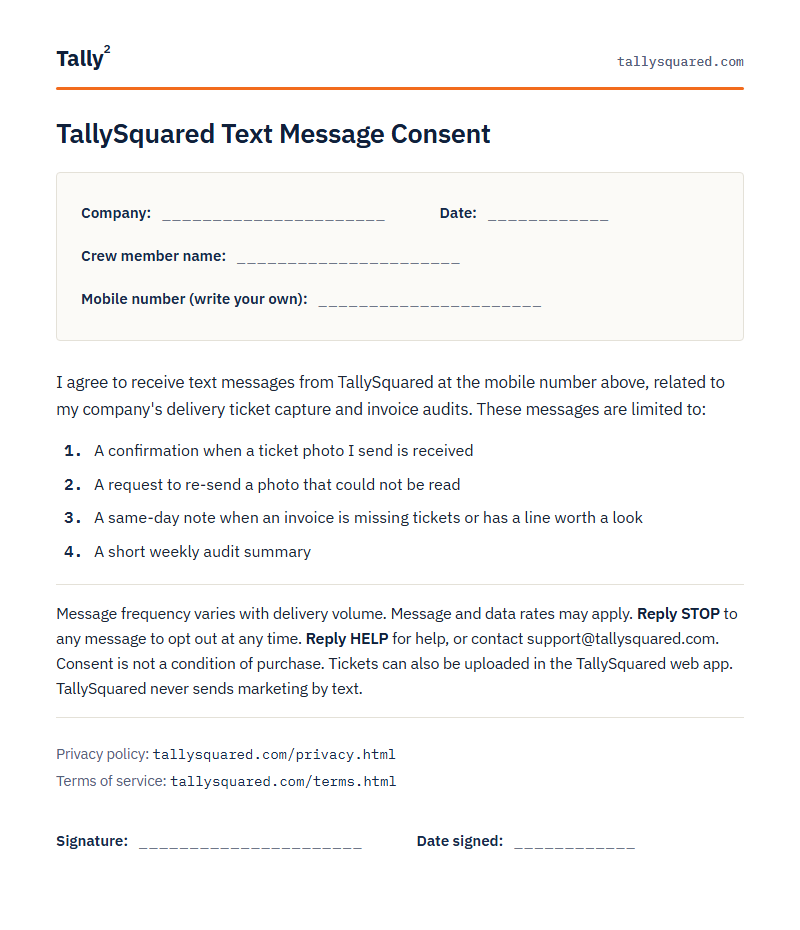
Print the consent form. One page, one signature, once per crew member.
What we send
Messages are limited to:
- A confirmation when a ticket photo is received
- A request to re-send a photo that could not be read
- A same-day note when an invoice is missing tickets or has a line worth a look
- A short weekly audit summary
Message frequency varies with delivery volume. Most texts a crew member receives are confirmations of tickets they just sent. Message and data rates may apply. TallySquared never sends marketing by text.
Opting out and getting help
Reply STOP to any message to opt out at any time; opting out stops all TallySquared texts to that number immediately and permanently. Reply HELP for help, or contact support@tallysquared.com. Consent is not a condition of purchase. Texting is optional. Ticket photos can also be uploaded in the TallySquared web app, and signing the consent form is not required to use TallySquared. See our Privacy Policy and Terms of Service for how your number, your documents, and your account data are handled.